 |
Menu |
 |
|
 Home Home |
| |
|
 Discussions Discussions |
| |
|
 Tools Tools |
| |
|
| Affiliates |
| |
|
 Content Content |
| |
|
 Info Info |
| | |
|
|
|
|
|
User Info |
|
 Membership: Membership:
 Latest: MichaelSnaRe Latest: MichaelSnaRe
 New Today: 0 New Today: 0
 New Yesterday: 0 New Yesterday: 0
 Overall: 9144 Overall: 9144
 People Online: People Online:
 Visitors: 69 Visitors: 69
 Members: 0 Members: 0
 Total: 69 Total: 69
|
|
|
|
|
|
Full disclosure |
|
|
|
 |
|
 |
 |
|
 |
IT Security and Insecurity Portal |
|
|
HttpWatch is an integrated HTTP sniffer for IE and Firefox |
|
 Posted: Mon Jul 12, 2010 8:58 pm Posted: Mon Jul 12, 2010 8:58 pm |
 |
|
| sEcZx |
| Regular user |

 |
|
| Joined: Jul 09, 2010 |
| Posts: 9 |
|
|
|
 |
|
 |
|
Name.........: HttpWatch Professional v7.0.23
Release Date.: 23-06-2010
Language.....: English
OS...........: WinAll
Protection...: Serial
Company......: Simtec
Url..........: http://www.httpwatch.com
Money saved..: 395$
HttpWatch is an HTTP viewer and debugger that integrates with IE and Firefox to provide seamless HTTP and HTTPS monitoring without leaving the browser window.
Features:
* A plug-in HTTP viewer for Internet Explorer and Mozilla Firefox
* See headers, cookies, caching and POST data
* Supports HTTPS, compression, redirection & chunked encoding
* Real-time page and request level time charts
* Your users and customers can send you log files for free
* Millisecond accurate performance timings and network level data
* Use it in automated tests written in C#, Ruby, Javascript, ...
HttpWatch Professional Edition Version 7.xHTTP Viewer for IE 6.0 - 8.0 and Firefox 2.0 - 3.6
Why do you need an HTTP Viewer or Sniffer?All web applications make extensive use of the HTTP protocol (or HTTPS for secure sites). Even simple web pages require the use of multiple HTTP requests to download HTML, graphics and javascript. The ability to view the HTTP interaction between the browser and web site is crucial to these areas of web development:
BenefitsSeamless HTTP and HTTPS monitoring without changing network settings or adding proxiesSee low-level HTTP information such as headers, cookies, etc and millisecond accurate timings.Real-time page and request level time charts show performance bottlenecksYour users and customers can send you log files for freeAutomatically detects and highlights potential configuration, performance and security problemsUse it in automated tests written in C#, Ruby, Javascript, ...
Uses of HttpWatchHttpWatch is used in a wide variety of companies and industries for tasks such as:
Testing a web application to ensure that it is correctly issuing or setting headers that control page expiration
Finding out how other sites work and how they implement certain features
Checking the information that the browser is supplying when you visit a site
Verifying that a secure web site is not issuing sensitive data in cookies or headers
Tuning the performance of a web site by measuring download times, caching or the number of network round trips
Learning about how HTTP works (useful for programming and web design classes)
Alowing webmasters to fine tune the caching of images and other content
Performing regression testing on production servers to verify performance and correct behavior .
Why HttpWatch?Seven reasons to use HttpWatch rather than other HTTP monitoring tools:
1.Easy to Use - start logging after just a couple of mouse clicks in Internet Explorer or Firefox. No other proxies, debuggers or network sniffers have to be configured
2.Productive - quickly see cookies, headers, POST data and query strings without having to manually decode raw HTTP packets
3.Robust - reliably log thousands of HTTP transactions for hours or days while tracking down intermittent problems
4.Accurate - HttpWatch has minimal impact on the normal interaction of the browser with a web site. No extra network hops are added, allowing you to measure real world HTTP performance
5.Flexible - HttpWatch only requires client-side installation and will work with any server side technology that renders HTML pages in Internet Explorer or Firefox. No special server-side permissions or configurations are required - ideal for use against production servers on the Internet or Intranet
6.Comprehensive - works with HTTP compression, redirection, SSL encryption & NTLM authentication. A complete automation interface provides access to recorded data and allows HttpWatch to be controlled from most popular programming languages.
Trouble shooting
Performance tuning
Verifying that a site is secure and does not expose sensitive information
How can HttpWatch help?HttpWatch integrates with Internet Explorer and Firefox browsers to show you exactly what HTTP traffic is triggered when you access a web page. If you access a site that uses secure HTTPS connections, HttpWatch automatically displays the decrypted form of the network traffic.
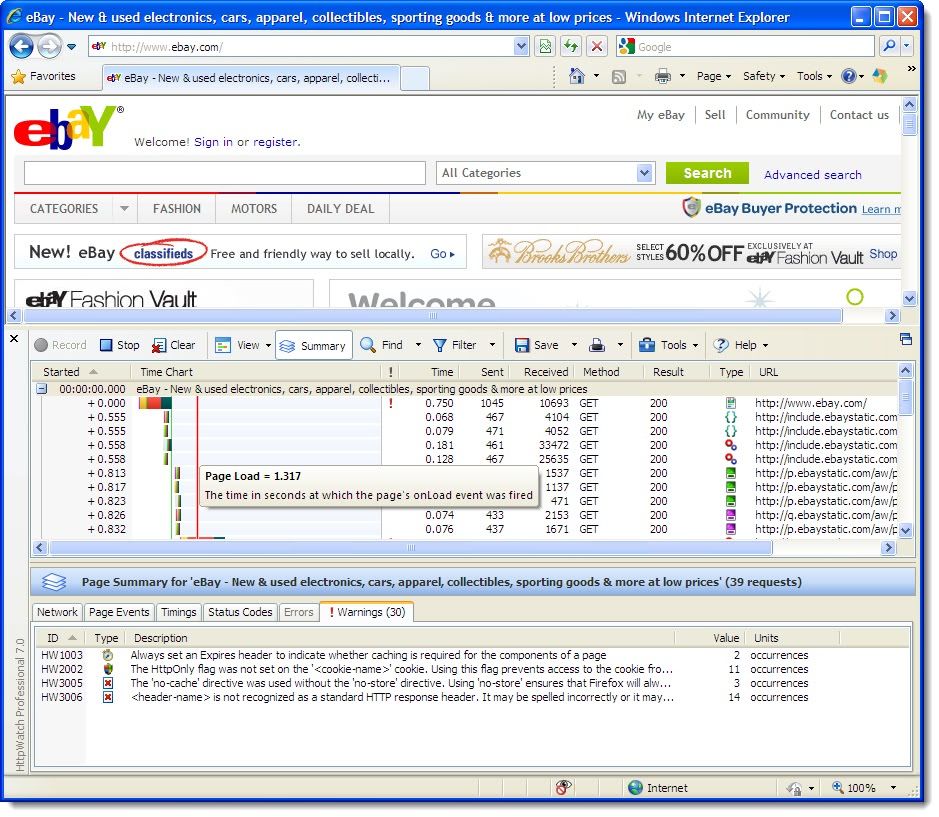
Screenshot of HttpWatch Conventional network monitoring tools just display low level data captured from the network. In contrast, HttpWatch has been optimized for displaying HTTP traffic and allows you to quickly see the values of headers, cookies, query strings and more...
HttpWatch also supports non-interactive examination of HTTP data. When log files are saved, a complete record of the HTTP traffic is saved in a compact file. You can even examine log files that your customers and suppliers have recorded using the free Basic Edition.
Trouble shooting
Performance tuning
Verifying that a site is secure and does not expose sensitive information
How can HttpWatch help?HttpWatch integrates with Internet Explorer and Firefox browsers to show you exactly what HTTP traffic is triggered when you access a web page. If you access a site that uses secure HTTPS connections, HttpWatch automatically displays the decrypted form of the network traffic.
Testimonials
As a web designer and tech lead at Microsoft for the last 12 years, I've used many different internal and commercial tools to trace and diagnose web based application issues. HttpWatch is clearly the best I've used and has quickly become the tool of choice for my team.
Scott Stabbort
Microsoft
HttpWatch has long supported exporting HTTP information. That’s one of the many reasons why it’s the packet sniffer I use almost exclusively.
Steve Souders
Web Performance Engineer, Google
HttpWatch Professional HttpWatch has enabled our team to have immediate and accurate answers to the question, "What is slowing down our site?". We use it daily to analyze our wide spectrum of web applications and sites. Its output formats are user-friendly to both human and data extraction tools, and great for storing a history of our performance analysis
David Artz
Director, AOL Optimization
Download :
http://rapidshare.com/files/406600024/sEcZx02.iso.html |
|
|
|
|
|
|
|
|
| Posted: Tue Jul 13, 2010 9:55 am |
|
|
| pexli |
| Valuable expert |

 |
|
| Joined: May 24, 2007 |
| Posts: 665 |
| Location: Bulgaria |
|
|
|
|
|
|
|
|
|
|
|
hello |
|
| Posted: Wed Jul 14, 2010 11:39 am |
|
|
| sEcZx |
| Regular user |
|
|
| Joined: Jul 09, 2010 |
| Posts: 9 |
|
|
|
|
|
|
|
 Thanks pexli but HttpWatch is better than . Thanks pexli but HttpWatch is better than .
 |
|
|
|
|
www.waraxe.us Forum Index -> Tools
You cannot post new topics in this forum
You cannot reply to topics in this forum
You cannot edit your posts in this forum
You cannot delete your posts in this forum
You cannot vote in polls in this forum
|
All times are GMT
Page 1 of 1
|
|
|
|
Powered by phpBB © 2001-2008 phpBB Group
|
|
|
|
|
|


